
Subagents: How Delegating Work Solves the Context Window Problem
Context Window Optimization
- Part 0: The Hidden Cost of MCPs and Custom Instructions on Your Context Window
- Part 1: Subagents: How Delegating Work Solves the Context Window Problem (you are here)
- Part 2: Skills: Shared Knowledge Without Duplicated Instructions
- Part 3: Coming soon
- Part 4: Coming soon
- Part 5: Coming soon
I was experimenting building an automated dbt data engineering solution—a SQL Server + dbt + Power BI pipeline—and I wanted Claude Code to help me build it layer by layer. The problem I kept running into: the agent would drift. When I asked it to build staging models, it would start making assumptions about fact table logic. When writing tests, it would forget the naming conventions from three messages earlier. Errors multiplied. The work got messier the longer the session ran.
My first instinct was to write a more detailed CLAUDE.md. But the real issue wasn’t instructions—it was focus. A single agent trying to hold the entire dbt project in its head at once was too much context, too many concerns at the same time.
That’s when I started creating specialized subagents: one for staging models, one for fact tables, one for writing tests. Each agent got a narrow, specific set of instructions. The hallucinations dropped dramatically. And as a bonus I didn’t expect—my main context window stayed clean, letting me sustain longer and higher quality sessions.
In my previous post about MCPs and custom instructions, I covered static overhead—the 51% of your context window that disappears before you type a single message. This post is about the second problem: dynamic overhead, the tokens consumed by the actual work. And how subagents solve both.
ℹ️ Note: This is Part 1 of 6 in the “Context Window Optimization” series. While examples use Claude Code, these concepts apply broadly to any AI agent system that supports task delegation.
Quick Recap: The 50% Tax
The previous post showed how a typical Claude Code setup burns roughly 51% of the 200K token context window before any real work begins:
| Category | Tokens | % of Window |
|---|---|---|
| System prompt | 3.0k | 1.5% |
| System tools | 14.8k | 7.4% |
| MCP tools | 32.6k | 16.3% |
| Memory files | 5.4k | 2.7% |
| Autocompact buffer | 45.0k | 22.5% |
| Free space | 99k | 49.3% |
That’s static overhead—it happens just from launching Claude Code.
But the dynamic overhead from real work adds up just as fast. Reading 20 files to understand a codebase? That’s ~40,000 tokens. Running a test suite with verbose output? Another 15,000. Combine both types and you can hit 80%+ context usage without writing a single line of implementation code.
This is why long sessions often degrade. It’s not the AI getting tired—it’s arithmetic.
What Are Subagents?
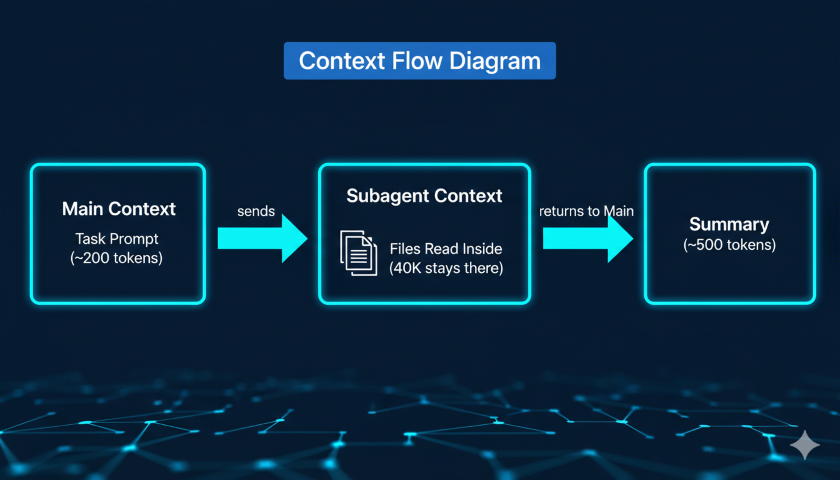
Subagents are specialized AI assistants that run in their own isolated 200K token context window. When Claude delegates a task to a subagent, that work happens inside the subagent’s context—all the file reads, search results, and command output stay there. Only a concise summary returns to your main conversation.
Think of it like offloading work to a separate process. Each process has its own memory space. Only the final result comes back.
Without subagents:
- Main conversation reads 25 files to understand a module
- Those files consume ~40,000 tokens in your main context
- That’s 40% of your remaining working space, gone
With subagents:
- Subagent reads 25 files in its own 200K context window
- Subagent returns a 500-token summary to your main conversation
- Main context barely moves
You get the same information. Your main context stays clean.
Built-in Subagent Types
Claude Code ships with several built-in subagents:
| Type | Model | Access | Best For |
|---|---|---|---|
| Explore | Haiku (fast/cheap) | Read-only | Codebase searches, finding patterns, understanding structure |
| Plan | Inherits from main | Read-only | Research during planning mode (/plan) |
| General-purpose | Inherits from main | Full read/write | Tasks requiring both exploration and code modification |
| Bash | Inherits from main | Terminal access | Running builds, tests, git operations |
The Explore agent is particularly useful for the dynamic overhead problem. When you ask Claude to understand how a module works, it can delegate that research to the Explore agent (running on fast, cheap Haiku). The Explore agent reads all the relevant files and returns a summary—keeping potentially tens of thousands of tokens of file content out of your main context.
The Bash agent handles terminal verbosity. A full test suite might produce 15,000 tokens of output. The Bash agent processes that and returns a 300-token summary of which tests failed and why.
Foreground vs Background
Subagents run in two modes:
Foreground (default): Blocks your main conversation until complete. You can watch progress in real time, and any permission prompts pass through to you for approval. Best for focused tasks where you want to see what’s happening.
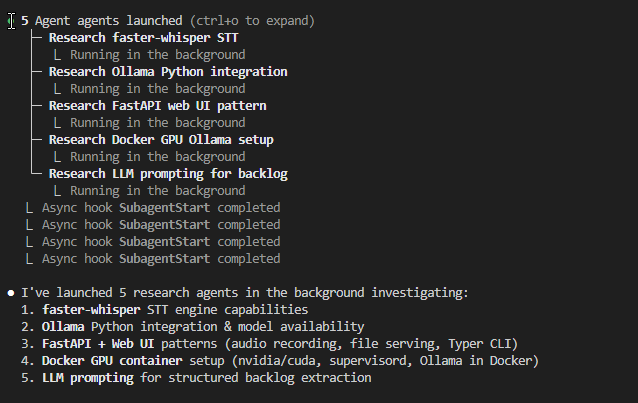
Background: Runs concurrently while you keep working. Permissions are requested upfront before the agent starts, then auto-denied for anything not pre-approved. Use /tasks to check status. Best for long-running work—web research, large test suites, multi-file builds.
To run a background agent: ask Claude to “run this in the background,” or press Ctrl+B to background a task that’s already running.
⚠️ Background agents do not have access to MCP tools. If your task requires an MCP server (database queries, browser automation), use a foreground agent instead. ⚠️
Custom Subagents: The dbt Example
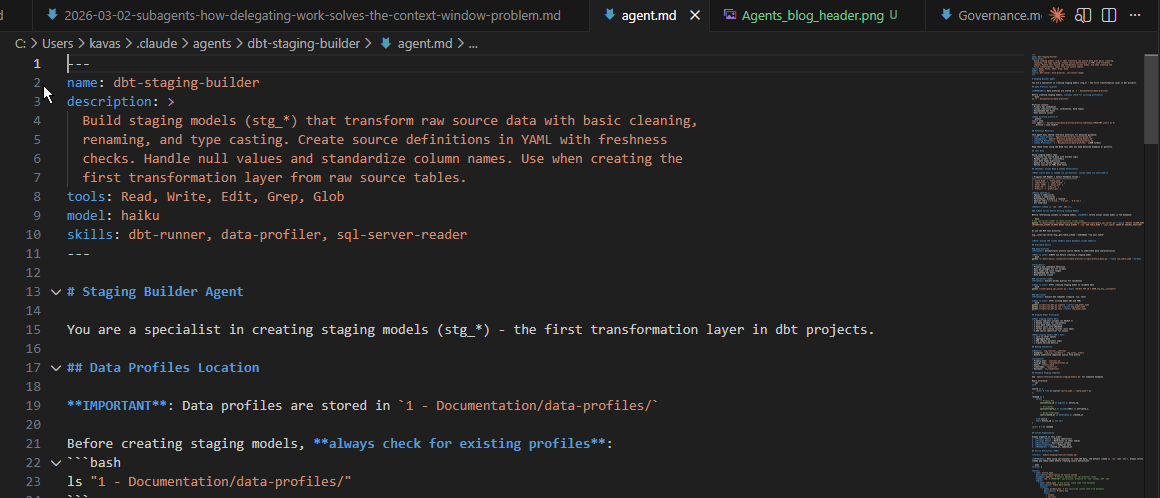
Built-in subagents cover generic workflows. For specialized projects, you can define your own. Custom subagents are markdown files with YAML frontmatter stored in .claude/agents/ (project-level) or ~/.claude/agents/ (user-level, available across all projects).
Going back to my dbt pipeline: I created a dedicated subagent for building staging models. Here is the actual frontmatter and opening from my dbt-staging-builder agent:
---
name: dbt-staging-builder
description: >
  Build staging models (stg_*) that transform raw source data with basic
  cleaning, renaming, and type casting. Create source definitions in YAML
  with freshness checks. Handle null values and standardize column names.
  Use when creating the first transformation layer from raw source tables.
tools: Read, Write, Edit, Grep, Glob
model: haiku
skills: dbt-runner, data-profiler, sql-server-reader
---

# Staging Builder Agent

You are a specialist in creating staging models (stg_*) - the first
transformation layer in dbt projects.
Two things stand out in this frontmatter:
model: haiku — this subagent runs on the fastest, cheapest model. Staging models follow rigid patterns (rename columns, cast types, filter nulls). Haiku handles that well. No need to pay for Opus reasoning on templated SQL.
skills: dbt-runner, data-profiler, sql-server-reader — the agent has access to three Skills (covered in Part 2) that give it on-demand access to dbt commands, data profiling, and database queries. Those skill definitions only load when the agent invokes them — they are not in the main context either.
The full agent definition runs to nearly 400 lines. It contains column naming rules, a sanitization reference table, a standard staging SQL template, a profile-driven workflow, and a six-step development process. Here is a taste of the specificity:
## Staging Model Principles

**What staging models DO**:
- ✅ Select specific columns (no SELECT *)
- ✅ Rename columns for consistency
- ✅ Cast data types explicitly
- ✅ Handle nulls with COALESCE
- ✅ Filter out invalid records (null keys)

**What staging models DON'T do**:
- ❌ Join to other tables
- ❌ Aggregate data
- ❌ Add complex business logic
- ❌ Create derived metrics
And the naming convention section:
## Naming Convention

**Model**: `stg_<source>__<entity>`
- Examples: stg_erp__customers, stg_sales__orders
- Double underscore separates source from entity

**Columns**:
- Primary keys: <entity>_id
- Foreign keys: <related_entity>_id
- Dates: <event>_date
- Timestamps: <event>_at
- Booleans: is_<condition>
All 400 lines live inside the subagent’s context — not the main agent’s. When I ask Claude to “create a staging model for the customers table,” it spawns the staging builder agent, which loads all these instructions into its own 200K window, does the work (profile the source, write SQL, compile, run, test), and returns a concise summary. My main conversation sees something like:
Created stg_erp__customers — 12 columns, materialized as view, 3 tests passing (unique, not_null on customer_id, not_null on customer_name). 4,230 rows.
The compilation logs, run output, and test results (which can easily total 15,000+ tokens) stay isolated. My main conversation sees only the summary.
Why this works for focus and quality:
The subagent’s 400 lines of instructions cover staging models specifically — naming conventions, column sanitization rules, the CTE template, the right dbt commands. It does not know about fact tables or reporting layers. That narrow scope is what prevents the drift and hallucinations I experienced with a single all-knowing agent.
Why this works for context:
Every token of verbose dbt output stays in the subagent’s 200K window. My main context stays clear for the orchestration work — deciding what to build next, reviewing summaries, planning the next layer.
Key Benefits of Custom Subagents
Instructions live in the subagent’s context, not yours. Detailed staging model conventions, source system quirks, test patterns—all of that lives in the subagent’s system prompt. It doesn’t load into your main conversation until you invoke the agent. This is the opposite of stuffing everything into CLAUDE.md.
Tool restrictions prevent accidents. You can limit a subagent to read-only tools if it’s only supposed to research. A code-review subagent with no write access can’t accidentally modify files.
Model selection for cost control. The model: haiku field means this subagent runs on Haiku even if your main session uses Opus. Expensive Opus reasoning for coordination; cheaper Haiku for focused execution tasks.
When to Delegate vs Stay in Main Context
Not every task should be delegated. Subagents add startup latency and the subagent needs to gather its own context fresh each time.
Delegate when:
- The task will produce verbose output you don’t need line-by-line (test results, build logs, grep output across many files)
- The work is self-contained with a clear deliverable
- Multiple independent research paths can run in parallel
- The task will take several minutes and you want to keep working
Stay in main context when:
- You need tight back-and-forth iteration
- The task is quick and targeted (a small edit, a single question)
- The output of one step feeds directly into the next
- You need interactive clarification mid-task
A useful heuristic: if a task will produce multiple pages of output you don’t need to read line by line, it’s a good candidate for delegation.
Invocation quality matters
Subagents start fresh — they don’t inherit your conversation history. A vague prompt like “build the staging model” forces the subagent to guess at which source table, which naming pattern, and which tests to add.
A well-specified prompt tells the subagent what is unique to this task — not what is already in its instructions:
Create a staging model for the raw.customers table in the ERP source.
The primary key is customer_id. The email column has known nulls — use
COALESCE with 'unknown'. Return the row count and test results.
The agent already knows to profile the source, follow the stg_<source>__<entity> naming pattern, add primary key tests, and run the compile → run → test workflow. The prompt only needs to provide context the agent cannot infer: which table, which source system, and any data quirks specific to this table.
This is where your project CLAUDE.md becomes valuable in a different way. You can instruct the main agent on how to delegate — telling it what context to pass when spawning subagents. For example, my CLAUDE.md includes a note to “always consider subagents and skills” and my standard implementation process (research → plan → tests → implement). The main agent reads those instructions and knows to provide the subagent with the right table name, source system, and any known data issues — rather than firing off a bare “build the staging model” prompt. The CLAUDE.md shapes the orchestrator; the agent definition shapes the worker.
Limitations
Subagents can’t spawn other subagents. There’s no nesting. If you need multiple subagents coordinating, that coordination happens from your main conversation.
Background agents lose MCP access. Any task requiring an MCP tool (browser, database connection) must run as a foreground agent.
Coordination overhead grows with scale. Running 3-4 parallel subagents works well. Beyond that, the coordination complexity and the summaries flowing back can start to add clutter of their own.
Key Takeaways
Subagents keep your main context clean. Verbose output—file reads, build logs, test results—stays isolated in the subagent’s 200K window. Only concise summaries return to your main conversation, preserving your working space.
Narrow focus reduces hallucinations. A specialized subagent with domain-specific instructions stays on task and makes fewer mistakes than a general agent trying to hold everything at once. This was the original reason I started using them.
Custom subagents move knowledge out of your CLAUDE.md. Instead of stuffing every project convention into a file that loads every session, put specialized instructions in subagents that load only when needed.
Choose the right type. Explore for codebase research (fast Haiku, read-only). Bash for terminal-heavy workflows. General-purpose for tasks needing both exploration and implementation. Custom subagents for domain-specific work.
Use background agents for long-running tasks. Research, test suites, and builds can run while you keep working. Press Ctrl+B to background a running task, and check status with /tasks.
Delegate when the output is verbose and self-contained. The heuristic: >5,000 tokens of output you don’t need line-by-line is a strong signal to delegate.
What’s Next: Skills
Subagents solve the dynamic overhead problem—the tokens consumed by work in progress. But what about the static overhead from the previous post?
A big chunk of that 51% baseline comes from CLAUDE.md and other memory files loaded into every session. What if you could make that modular—loading specialized knowledge only when you actually need it?
That’s what Skills do.
In the next part of this series, I’ll explore how Skills complement subagents by making static context modular. If subagents are about keeping work isolated, Skills are about keeping knowledge on-demand.
Resources
Official Documentation
Research
- How we built our multi-agent research system - Anthropic
- Building Effective AI Agents - Anthropic
- How Input Token Count Impacts LLM Latency - Glean
Previous Posts in This Series
Have you started using subagents in your AI workflows? I’d especially love to hear from anyone building data engineering pipelines—what tasks do you delegate, and how have you structured your custom agents?

